Introducing Logcannon
I've had this idea floating around my head for a few years: what if you could inject interesting log samples into your own security products, making them appear as if they came from a real asset logging in your environment, and could this be done quickly and easily, without relying on additional infrastructure or burdensome steps?
The Problem
Having worked on the defender side of the cyber security industry for over a decade, primarily in Threat Detection Engineering (TDE), I have many times found suspicious or malicious behaviour that I have wanted to turn into detections. However, getting an accurate representation of this activity inside of a product in which I can create robust threat detections often has some effort barriers which are annoying and slow you down.
That might mean having to assume how values might appear in a log, having to use labs to try and replicate the behaviour so it logs into a security product either through mocking the behaviour or using the real script, tool or the malware itself.
The Idea
To scope this idea down I originally focused on if it's possible to relay a Windows Event Log (EVTX) log file into some security products like Splunk and Elasticsearch in a way that makes them indistinguishable (or as close to) from an asset that is logging to that product. This would allow you to then more easily create a detection around this data and skip all the in-between messing around which is typically an unproductive use of time.
Over the last few years I've tried a few things that never quite worked but recently I took a fresh look (with the help of some AI) and I came up with something that works.
As for potential use cases, here are a few I have been thinking about:
- Represent real malicious activity easily and accurately in our own security products.
- Craft detections faster and more reliably, without extra overhead.
- Validate your existing detections by inserting these 'faux' logs to potentially trigger existing detections, reducing your effort spent responding to new threat intelligence.
- Easily test response time of your Security Operations Centre (SOC) with minimal setup (with the required prior approvals of course).
The Result
In an attempt to solve this problem I made Logcannon, a platform that allows you to quickly and easily insert 'real' looking logs into your existing security products within minutes with no additional infrastructure required.
As of now, Logcannon has the following features:
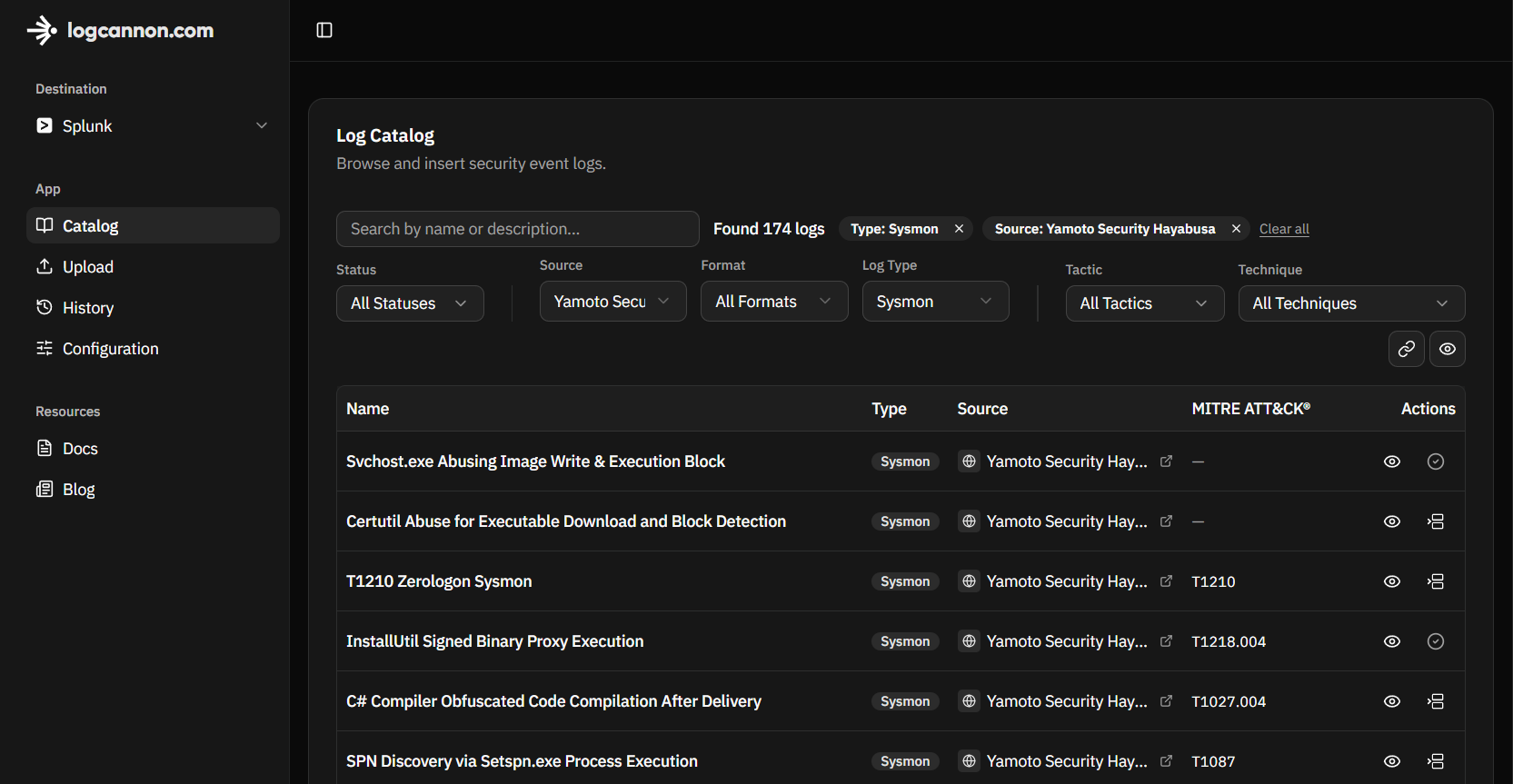
- Catalog which provides an open library of publicly available collections of EVTX samples.
- Upload so you can upload and send your own samples (these are private).
- View where you can view a selected sample in its translated format for all supported destinations.
- Insert which is used to send catalog or uploaded samples to your destination of choice.
How Logs are Translated
When Logcannon receives an EVTX file it parses each record and ships it in the shape your destination expects. Certain fields inside the logs (such as hostname and username) are adjusted so you can tell that the event was sent from Logcannon. Event time is aligned with when you insert from the catalog or an upload, rather than the original capture timestamps in the source EVTX.
Below is the same Sysmon EventID 1 (Process Create) event in three forms: the raw record as Windows logged it, then the per-destination translations.
The Raw Event
The XML record as it sits in the EVTX log from a host.
<Events>
  <Event xmlns="http://schemas.microsoft.com/win/2004/08/events/event">
    <System>
      <Provider Name="Microsoft-Windows-Sysmon" Guid="{5770385f-c22a-43e0-bf4c-06f5698ffbd9}"/>
      <EventID>1</EventID>
      <Version>5</Version>
      <Level>4</Level>
      <Task>1</Task>
      <Opcode>0</Opcode>
      <Keywords>0x8000000000000000</Keywords>
      <TimeCreated SystemTime="2019-05-12T17:20:49.4581131Z"/>
      <EventRecordID>16514</EventRecordID>
      <Correlation/>
      <Execution ProcessID="2012" ThreadID="300"/>
      <Channel>Microsoft-Windows-Sysmon/Operational</Channel>
      <Computer>IEWIN7</Computer>
      <Security UserID="S-1-5-18"/>
    </System>
    <EventData>
      <Data Name="RuleName"/>
      <Data Name="UtcTime">2019-05-12 17:20:49.277</Data>
      <Data Name="ProcessGuid">{365abb72-55f1-5cd8-0000-00103d1e3300}</Data>
      <Data Name="ProcessId">684</Data>
      <Data Name="Image">C:\Windows\System32\calc.exe</Data>
      <Data Name="FileVersion">6.1.7600.16385 (win7_rtm.090713-1255)</Data>
      <Data Name="Description">Windows Calculator</Data>
      <Data Name="Product">Microsoft® Windows® Operating System</Data>
      <Data Name="Company">Microsoft Corporation</Data>
      <Data Name="CommandLine">c:\Windows\system32\calc.exe</Data>
      <Data Name="CurrentDirectory">C:\Users\IEUser\Downloads\WinPwnage-master\WinPwnage-master\</Data>
      <Data Name="User">IEWIN7\IEUser</Data>
      <Data Name="LogonGuid">{365abb72-4fb5-5cd8-0000-0020f2350100}</Data>
      <Data Name="LogonId">0x135f2</Data>
      <Data Name="TerminalSessionId">1</Data>
      <Data Name="IntegrityLevel">Medium</Data>
      <Data Name="Hashes">SHA1=9018A7D6CDBE859A430E8794E73381F77C840BE0,MD5=60B7C0FEAD45F2066E5B805A91F4F0FC,SHA256=80C10EE5F21F92F89CBC293A59D2FD4C01C7958AACAD15642558DB700943FA22,IMPHASH=F93B5D76132F6E6068946EC238813CE1</Data>
      <Data Name="ParentProcessGuid">{365abb72-55f1-5cd8-0000-0010781c3300}</Data>
      <Data Name="ParentProcessId">2392</Data>
      <Data Name="ParentImage">C:\Windows\System32\cmd.exe</Data>
      <Data Name="ParentCommandLine">C:\Windows\system32\cmd.exe /C c:\Windows\system32\calc.exe</Data>
    </EventData>
  </Event>
</Events>
Translated to Splunk
Sent to Splunk via the HTTP Event Collector as JSON, with normalized Sysmon XML in the event field and metadata on time, host, source, sourcetype, and index so it indexes like other XmlWinEventLog Sysmon data. The Sysmon <Data> elements stay in that XML (Image, CommandLine, Hashes, parent process, and so on) for Technical Add-ons to extract.
{"time": 1778113182.458113, "host": "3bef3dd9-89a8-4696-b9d5-6b548e8866eb.logcannon.com", "source": "XmlWinEventLog:Microsoft-Windows-Sysmon/Operational", "sourcetype": "XmlWinEventLog:Microsoft-Windows-Sysmon/Operational", "index": "logcannon", "event": "<Event xmlns='http://schemas.microsoft.com/win/2004/08/events/event'><System><Provider Name='Microsoft-Windows-Sysmon' Guid='{5770385f-c22a-43e0-bf4c-06f5698ffbd9}'/><EventID>1</EventID><Version>5</Version><Level>4</Level><Task>1</Task><Opcode>0</Opcode><Keywords>0x8000000000000000</Keywords><TimeCreated SystemTime='2026-05-07T00:19:42.458113Z'/><EventRecordID>16514</EventRecordID><Correlation/><Execution ProcessID='2012' ThreadID='300'/><Channel>Microsoft-Windows-Sysmon/Operational</Channel><Computer>3bef3dd9-89a8-4696-b9d5-6b548e8866eb.logcannon.com</Computer><Security UserID='S-1-5-18'/></System><EventData><Data Name='RuleName'></Data><Data Name='UtcTime'>2026-05-07 00:19:42.277</Data><Data Name='ProcessGuid'>{365abb72-55f1-5cd8-0000-00103d1e3300}</Data><Data Name='ProcessId'>684</Data><Data Name='Image'>C:\\Windows\\System32\\calc.exe</Data><Data Name='FileVersion'>6.1.7600.16385 (win7_rtm.090713-1255)</Data><Data Name='Description'>Windows Calculator</Data><Data Name='Product'>Microsoft® Windows® Operating System</Data><Data Name='Company'>Microsoft Corporation</Data><Data Name='CommandLine'>c:\\Windows\\system32\\calc.exe</Data><Data Name='CurrentDirectory'>C:\\Users\\IEUser\\Downloads\\WinPwnage-master\\WinPwnage-master\\</Data><Data Name='User'>LOGCANNON\\IEUser</Data><Data Name='LogonGuid'>{365abb72-4fb5-5cd8-0000-0020f2350100}</Data><Data Name='LogonId'>0x135f2</Data><Data Name='TerminalSessionId'>1</Data><Data Name='IntegrityLevel'>Medium</Data><Data Name='Hashes'>SHA1=9018A7D6CDBE859A430E8794E73381F77C840BE0,MD5=60B7C0FEAD45F2066E5B805A91F4F0FC,SHA256=80C10EE5F21F92F89CBC293A59D2FD4C01C7958AACAD15642558DB700943FA22,IMPHASH=F93B5D76132F6E6068946EC238813CE1</Data><Data Name='ParentProcessGuid'>{365abb72-55f1-5cd8-0000-0010781c3300}</Data><Data Name='ParentProcessId'>2392</Data><Data Name='ParentImage'>C:\\Windows\\System32\\cmd.exe</Data><Data Name='ParentCommandLine'>C:\\Windows\\system32\\cmd.exe /C c:\\Windows\\system32\\calc.exe</Data></EventData></Event>"}
Translated to Elasticsearch (ECS)
Sent to your Elasticsearch cluster via API as a JSON document shaped to the Elastic Common Schema. Sysmon fields are mapped to their ECS equivalents (Image → process.executable, CommandLine → process.command_line, Hashes → process.hash.*, and so on) depending on exactly which ECS fields appear depends on ingest path and enrichment.
{
  "@timestamp": "2026-05-07T00:19:42.458113Z",
  "event": {
    "module": "sysmon",
    "code": 1,
    "provider": "Microsoft-Windows-Sysmon/Operational"
  },
  "host": { "name": "3bef3dd9-89a8-4696-b9d5-6b548e8866eb.logcannon.com" },
  "user": {
    "name": "LOGCANNON\\IEUser",
    "id": "{365abb72-4fb5-5cd8-0000-0020f2350100}"
  },
  "process": {
    "entity_id": "{365abb72-55f1-5cd8-0000-00103d1e3300}",
    "pid": 684,
    "executable": "C:\\Windows\\System32\\calc.exe",
    "command_line": "c:\\Windows\\system32\\calc.exe",
    "working_directory": "C:\\Users\\IEUser\\Downloads\\WinPwnage-master\\WinPwnage-master\\",
    "session_id": "1",
    "user": { "id": "0x135f2" },
    "pe": {
      "file_version": "6.1.7600.16385 (win7_rtm.090713-1255)",
      "description": "Windows Calculator",
      "product": "Microsoft® Windows® Operating System",
      "company": "Microsoft Corporation",
      "imphash": "F93B5D76132F6E6068946EC238813CE1"
    },
    "hash": {
      "md5": "60B7C0FEAD45F2066E5B805A91F4F0FC",
      "sha1": "9018A7D6CDBE859A430E8794E73381F77C840BE0",
      "sha256": "80C10EE5F21F92F89CBC293A59D2FD4C01C7958AACAD15642558DB700943FA22"
    },
    "Ext": { "token": { "integrity_level_name": "Medium" } },
    "parent": {
      "entity_id": "{365abb72-55f1-5cd8-0000-0010781c3300}",
      "pid": 2392,
      "executable": "C:\\Windows\\System32\\cmd.exe",
      "command_line": "C:\\Windows\\system32\\cmd.exe /C c:\\Windows\\system32\\calc.exe"
    }
  }
}
How Logs are Transported
The platform applies a processing pipeline to samples from the catalog/uploads and these are referred to as Inserts. If the sample is already stored (previously inserted or from the catalog), a job is triggered and retrieves that Windows Event Log (EVTX), parses it into a normalized stream of events, reshapes each event for the product you configured, then delivers the batch to your endpoint. From your side the result is the same as any other ingested host data. You can then search it, create/tune detections, all without having to reproduce the original activity via another method.
In order to do this you must first configure a destination in Configuration which currently supports Splunk and Elasticsearch, noting that these only support internet accessible logging endpoints... for now. It goes without saying that you will need to have the prerequisites for your destinations already satisfied prior to this, such as the appropriate Splunk Technical Add-ons (TAs) to support EVTX log parsing for example.
A quick note on securing these tokens. They are encrypted prior to being stored in the database. Since these tokens are used for writing log data the overall risk is fairly low.
Supported Public Repositories
As of this blog post the Catalog has samples derived from these repositories:
- Hayabusa EVTX by Yamato Security (@SecurityYamato)
- EVTX-ATTACK-SAMPLES by Samir Bousseaden (@sbousseaden)
- EVTX to MITRE ATT&CK by Michel de Crevoisier (@mdecrevoisier)
You can learn more in the Docs, one area that might be of interest is Docs | Support Log Types.

If you notice any bugs, sample translation quality issues, or have other feedback such as feature requests you can use the Feedback button in the sidebar.
What's Next
For the next few weeks I will see how it performs overall, fix bugs and gather feedback, I'm sure there will be some bugs and potential infrastructure changes needed, so if you notice any issues please reach out to me via the Feedback button or with the links below.
As for new features I'd prefer to follow the demand of the users but I do have a few ideas... Maybe something Sigma related 👀. If you'd like to see if your security product of choice is compatible please contact me and we can potentially have a chat, I do have a few other products in the backlog but would prefer to prioritise to what people are using.
Anyway, thanks for taking the time to read this post, I'm hoping this can turn into something useful for people and I will see where it goes from here!
If you would like to try Logcannon you can create a free account, if you have any feedback or ideas for improvement I'd love to hear it, you can reach out to me directly on LinkedIn or X.